How AI Coding Tools Like Claude Code Actually Work — And How I Built My Own in Go
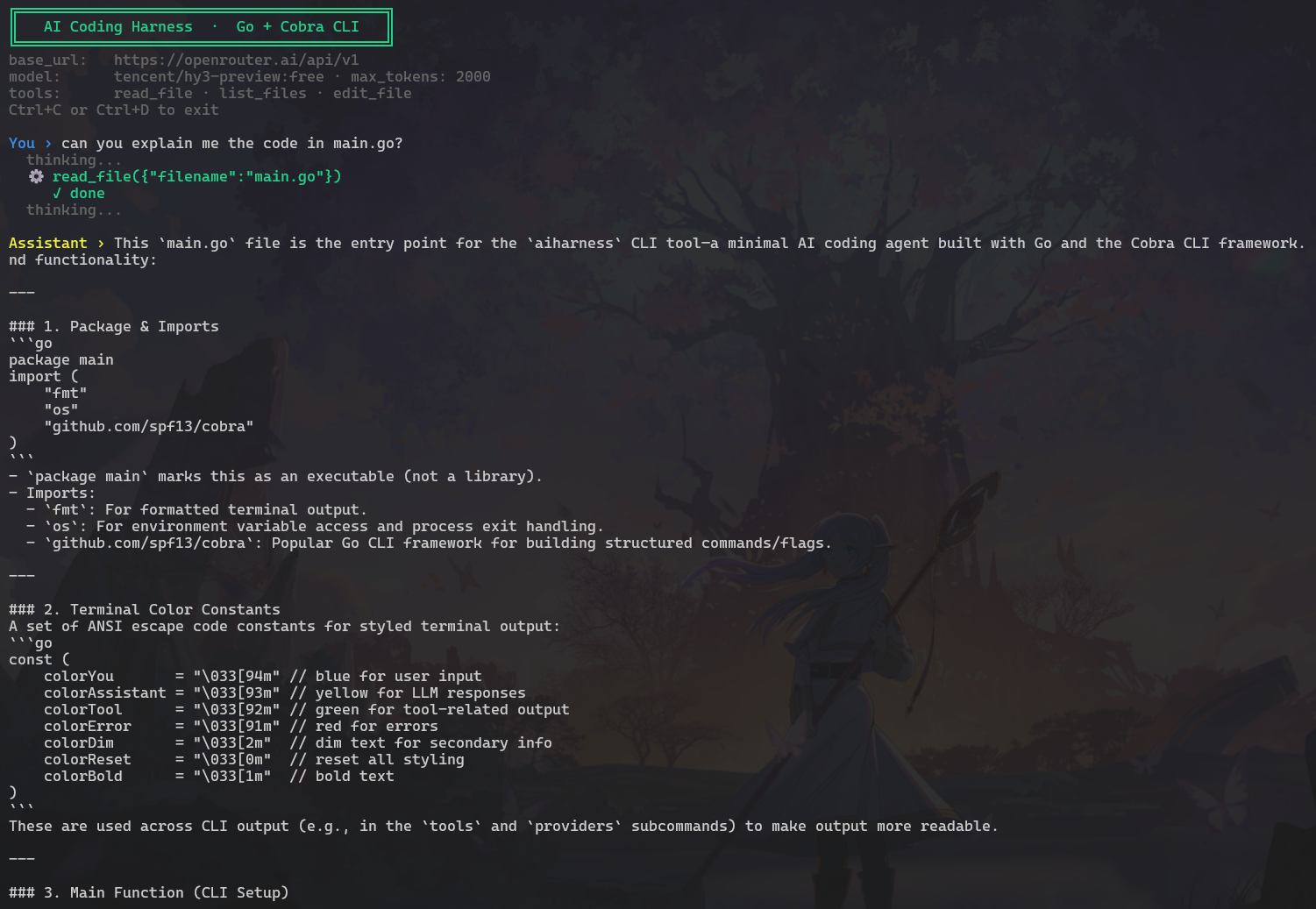
Every developer is using AI coding assistants in 2025. Most have no idea how they actually work. I found out and built one myself.
What are Claude Code, Cursor, and Copilot?
If you've used an AI coding assistant recently, you've probably had a moment like this:
You type "add error handling to this function" and the AI opens your file, reads it, makes the change, checks if related files are affected, then tells you what it did.
It feels like a junior developer sitting next to you who understands your project.
It's just a loop
Tools like Claude Code, Cursor, and GitHub Copilot are built on a pattern called an agentic loop. Here's how it works:
Step 1. You type a request, like: "explain the main.go file to me"
Step 2. The AI thinks: "I need to read that file first." So it asks your computer to open it.
Step 3. Your computer reads the file and sends the contents back.
Step 4. The AI reads the file and thinks: "Now I have enough to answer."
Step 5. The AI gives you the explanation.
That's the whole thing. If the AI needs more information (say it wants to check another file), it repeats steps 2 through 4 before giving its final answer.
The important part: the AI never directly touches your computer. It only asks questions. Your local machine does the actual work. The AI just decides what to ask for next.
This is what Mihail Eric described in his post "The Emperor Has No Clothes", which pushed me to build my own version.
So I built one: ai-harness
I built ai-harness. It's a minimal AI coding agent that runs in your terminal, written in Go.
Less powerful than Claude Code, but completely transparent. You can read every line and understand exactly what's happening.
The whole thing is around 300 lines of code.
What can it do?
ai-harness gives the AI three abilities called tools:
Tool What it does read_file Opens a file and reads its contents list_files Shows what files exist in a folder edit_file Creates a new file or makes a change to an existing one
With just these three tools, the agent can explore an entire codebase, understand what's in it, and make changes. Same basic idea as Claude Code, smaller toolbox.
How the AI knows which tool to call
Most people find this part surprising: the AI learns about tools through plain text instructions in the system prompt, a set of rules you give the AI before the conversation starts.
It looks something like this:
You are a coding assistant. You have access to these tools:

Tool: read_file
- Use this to read the contents of any file
- Call it like this: read_file({"filename": "main.go"})

Tool: list_files
- Use this to see what files exist in a directory
- Call it like this: list_files({"path": "."})
When the AI wants to use a tool, it includes that in its response:
tool: read_file({"filename": "main.go"})Your program sees that line, runs the tool, and sends the result back. Just text parsing and file operations.
Use any AI model you want
Most AI coding tools lock you into one provider. Claude Code uses Anthropic. Copilot uses OpenAI. You pay their prices, you follow their rules.
ai-harness is BYOK (Bring Your Own Key). You connect it to any AI provider you choose. It uses the OpenAI API format, which almost every provider now supports.
A year ago this wasn't possible. Every AI API was different. OpenAI had its format, Anthropic had theirs, Google had theirs. Now you write to one interface and it works everywhere. That makes building open source tools like this way more practical.
Free option via OpenRouter, no credit card required
aiharness run \
  --base-url https://openrouter.ai/api/v1 \
  --model meta-llama/llama-3.3-8b-instruct:free \
  --api-key YOUR_KEY

Google's Gemini model
aiharness run \
  --base-url https://generativelanguage.googleapis.com/v1beta/openai \
  --model gemini-2.0-flash \
  --api-key YOUR_GEMINI_KEY

Run a model locally (no internet, no API key)
aiharness run \
  --base-url http://localhost:11434/v1 \
  --model llama3.2
Supported providers: OpenRouter, Google Gemini, Groq, Anthropic, OpenAI, Mistral, Together AI, and Ollama (fully local).
What surprised me
The intelligence in a tool like Claude Code lives almost entirely in the AI model itself. The surrounding code, the harness, is surprisingly simple. It reads a line of text, runs a file operation, sends a result back. That's it. The model does the thinking. The harness is just the hands.
I also assumed I'd need dozens of tools to make the agent useful. Read, edit, list files. Only three. Turns out that's enough for a lot of tasks: explain a codebase, add a function, find where something is defined, fix a bug.
How to run it yourself
You'll need Go installed. Then:
Download the code
git clone https://github.com/nikhil3113/ai-harness
cd ai-harness

Build the tool
go build -o aiharness .

Get a free API key from openrouter.ai (no credit card)
Then run:
./aiharness run \
  --base-url https://openrouter.ai/api/v1 \
  --model meta-llama/llama-3.3-8b-instruct:free \
  --api-key YOUR_OPENROUTER_KEY
Once it's running, try asking it:
"List all the files in this project"
"Explain what main.go does"
"Create a new file called hello.go with a hello world program"
Watch how it uses the tools. It'll show you exactly which tool it's calling and why, right in the terminal.
CLI commands
ai-harness uses a command-line interface built with Cobra (the same library used by Kubernetes and Hugo).
Command What it does aiharness run Start the coding agent aiharness tools Show available tools and how to call them aiharness providers List all supported AI providers with example URLs aiharness version Show version info
What's next
A few features I'm planning to add:
Run commands. Let the agent execute terminal commands (with a confirmation prompt before anything runs, for safety).
Search across files. Let the agent grep through an entire codebase.
Streaming output. Show the AI's response word by word as it's generated, rather than waiting for the full response.
Session memory. Remember past conversations across sessions, not just within one.
Why I built this
The point wasn't to replace Claude Code. It was to understand how these things work, because once you do, they stop feeling like magic.
When you know that Claude Code is a loop with some file system tools, you can start imagining your own specialized agent. One that works with your database, your internal APIs, your workflow.
Source code: github.com/nikhil3113/ai-harness
More posts like this at nikchavan.com/blogs